
Resident Alerts and Balances Visible the Moment You Open a File
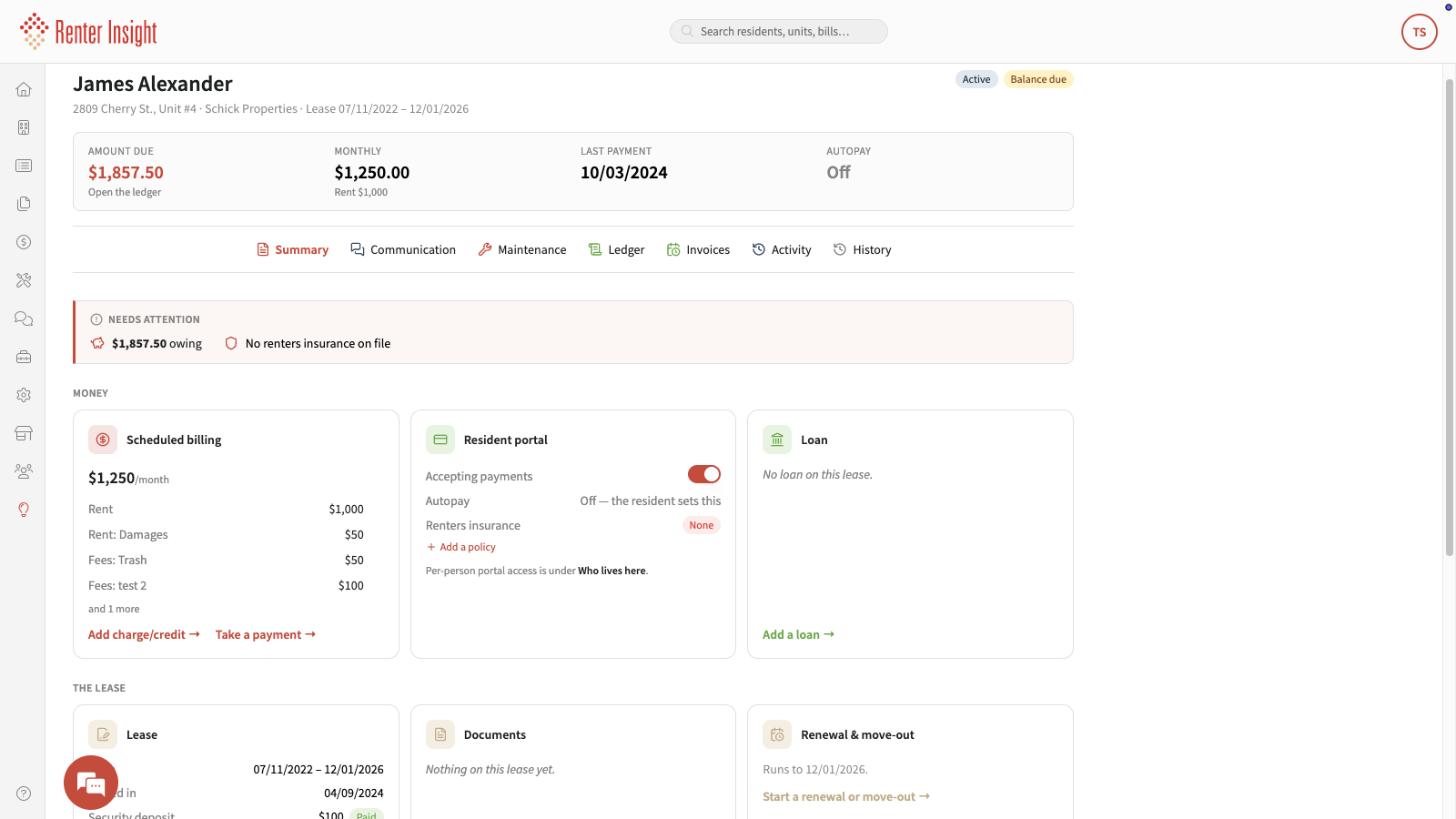
Renter Insight, our property management software built for manufactured housing parks and rental portfolios of 50 or more units, puts every critical resident flag in one place before you have to go looking. The single most useful takeaway: the moment you open a resident profile, you already know what needs attention.
What does the resident summary view actually show you?
The resident summary view displays the full financial picture for any resident in a single screen. You can see the total amount owed, the last payment date, the scheduled billing breakdown, and any active alerts, without opening a second tab, a spreadsheet, or a separate notes file.
- Amount owed: Displayed immediately, so there is no need to calculate or cross-reference. The example shown in our interface reflects a balance of $1,857.50.
- Last payment date: Visible at a glance so you can judge how overdue a balance is in context.
- Scheduled billing breakdown: Shows upcoming charges so you can anticipate cash flow and resident questions.
- Needs Attention alerts: A dedicated flag that calls out outstanding balances and missing renters insurance policies simultaneously.
Why does flagging missing renters insurance and no autopay matter?
Missing renters insurance and residents not enrolled in autopay are two of the most common issues that quietly create risk and extra work for management teams. Catching both on the same screen means your team can act in the same conversation rather than scheduling a follow-up.
When a resident does not carry renters insurance, the exposure falls elsewhere. When a resident is not on autopay, late payments become more likely and rent reminders have to be sent manually. The resident summary view flags both conditions under a single Needs Attention label so nothing slips past during a busy day. Our platform also supports auto late fees and automated rent reminders, so once you spot the gap, the tools to address it are already inside Renter Insight.
How does this kind of visibility help teams managing 50 or more units?
At scale, small oversights compound quickly. A missed balance on one unit is manageable; the same oversight repeated across dozens of units becomes a cash flow and compliance problem. Resident-level visibility that loads instantly means your team spends less time tracking things down and more time resolving them.
The practical benefits add up across a portfolio:
- Fewer missed issues because alerts surface automatically rather than depending on someone remembering to check.
- Fewer uncomfortable surprises during ownership or financial reporting.
- Less time spent cross-referencing notes, spreadsheets, and separate systems.
- Faster conversations with residents because your team already has the full picture before picking up the phone.
For mobile home park owners and multifamily managers who need to move quickly, that kind of resident-level clarity is not a convenience. It is how you stay ahead of problems instead of reacting to them.
Frequently asked questions
What is the Needs Attention alert in Renter Insight?
The Needs Attention alert is a flag that appears on the resident summary screen inside Renter Insight. It calls out specific issues, such as an outstanding balance or a missing renters insurance policy, so your team can see every open item in one place without digging through separate records.
Does Renter Insight support renters insurance tracking?
Yes. Renter Insight includes renters insurance as part of its feature set and will flag residents who do not have an active policy directly on their resident profile. This allows property managers to identify and follow up on coverage gaps quickly.
Can residents enroll in autopay through Renter Insight?
Yes. Renter Insight supports autopay for renters along with multiple payment methods including ACH, credit card, debit card, and CashPay. The resident summary view will indicate when a resident is not enrolled in autopay so managers can prompt enrollment.
Is the resident summary view useful for portfolios with more than one property?
Yes. Renter Insight is built for management teams running portfolios across manufactured housing parks, single-family, and multifamily properties. The resident-level visibility described here applies across every unit in your portfolio, not just a single property.
What support options does Renter Insight offer?
Renter Insight provides US-based phone, email, chat, and text support. If you have questions about setting up resident alerts or configuring your account, the support team is available through all of those channels.
If you want to see how Renter Insight keeps your team ahead of resident issues rather than chasing them, take a closer look at the resident summary view and reach out to our team to learn how it fits your portfolio.