
How RUBS Utility Billing Works in Renter Insight
If you manage a property with shared utilities, you are likely absorbing water, sewer, and trash costs that should be passed through to residents. RUBS, short for Ratio Utility Billing System, solves that problem by splitting a master utility bill across residents based on a set ratio. Renter Insight builds this entire workflow into one screen, with approval controls and a searchable billing history included.
What is RUBS and how does it split utility costs?
RUBS takes a single master utility bill and divides it among residents according to a defined ratio, so each resident pays their fair share rather than the owner absorbing those costs through net operating income. The calculation happens automatically once the ratio is set, removing the need for manual math or spreadsheet work every billing cycle.
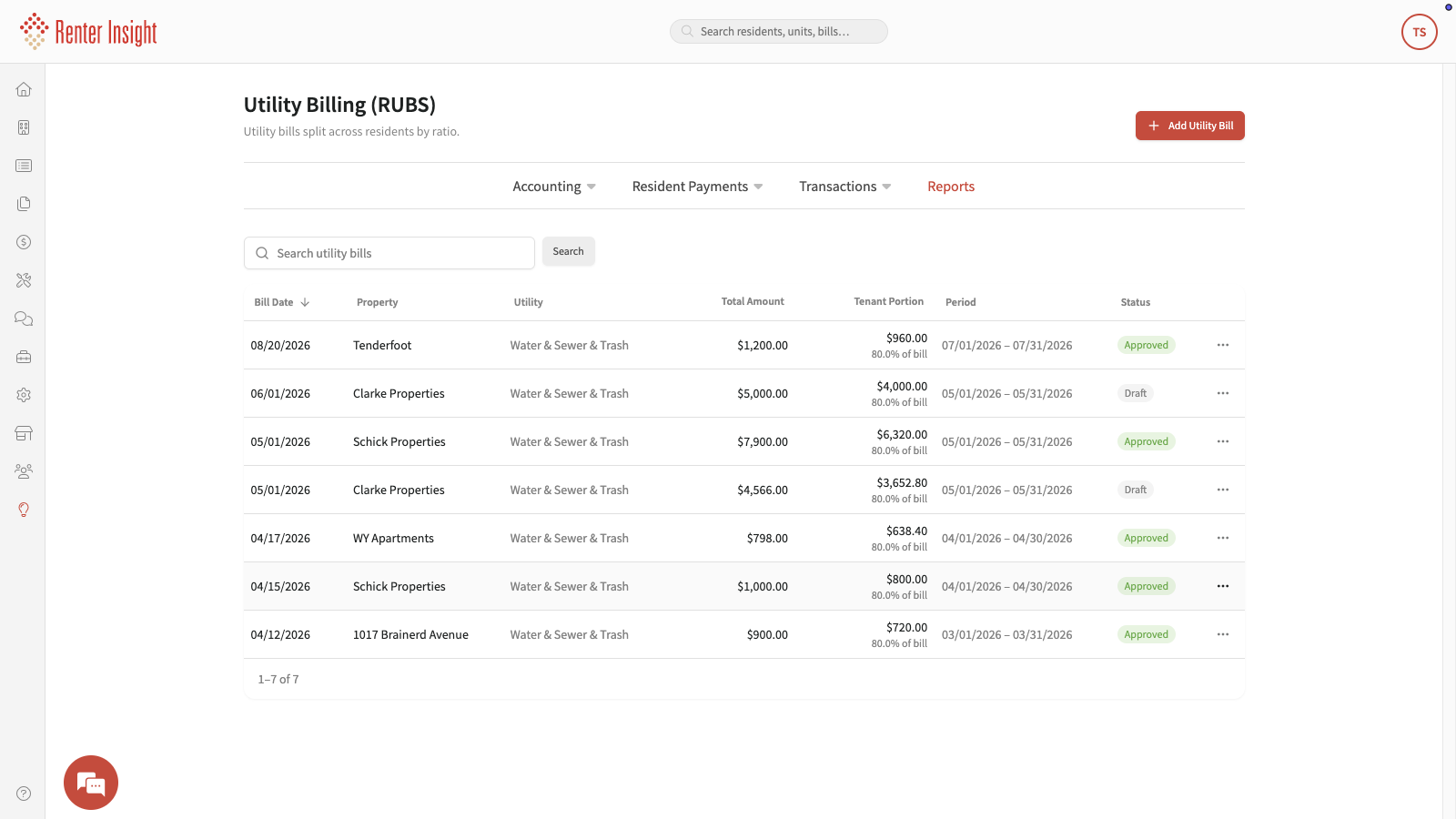
For example, in our Utility Billing screen, a $1,200 water and sewer bill at Tenderfoot is split so residents cover $960, or 80% of the bill. At Schick Properties, a $7,900 bill passes through $6,320 to residents. Those recovered dollars go directly back to your bottom line every month, which adds up significantly across a portfolio of 50 or more units.
How does the RUBS billing screen work in practice?
The Utility Billing screen in Renter Insight shows every bill across your portfolio in one place, with enough detail to review and approve each entry before it reaches residents. Every line displays the property name, the billing period, the total bill amount, the tenant portion, and a status of either Approved or Draft.
The Draft and Approved statuses are the key to a clean process:
- Draft means the bill is visible to you but has not been sent to residents yet, giving you a chance to review figures before anything goes out.
- Approved means the bill is confirmed and residents are billed their portion.
- Every entry stays in a searchable history, so you can pull up past bills for any property at any time.
What does setup look like, and what ongoing work is required?
Getting RUBS running in Renter Insight requires very little ongoing effort. You set your ratio once, and the system handles the math for each new billing cycle from that point forward. The steps are straightforward:
- Configure your ratio inside your property or portfolio settings.
- Enter the master utility bill amount for the billing period.
- Review the generated tenant portions while the bill is in Draft status.
- Approve the bill when the figures look correct.
- Residents are billed their share automatically.
Because Renter Insight keeps a full billing history, you always have documentation available for resident questions, audits, or reporting purposes.
Frequently asked questions
What types of utilities can RUBS cover?
RUBS is suited for shared utility costs such as water, sewer, and trash. Any master bill that covers multiple units and needs to be divided across residents is a candidate for ratio billing.
Can I review a bill before residents see it?
Yes. Every bill starts in Draft status, which means it is visible to you for review but has not been sent to residents. You move it to Approved only when you are satisfied the figures are correct.
Is RUBS billing available for both manufactured housing parks and multifamily properties?
Yes. Renter Insight supports RUBS billing for Manufactured Housing Parks, single-family portfolios, and multifamily properties. The feature is designed for management teams handling 50 or more units across any of those property types.
Does Renter Insight keep a history of past utility bills?
Yes. Every utility bill entry is stored in a searchable history within the Utility Billing screen, so you can look up any property, billing period, or bill amount across your entire portfolio.
What support is available if I need help setting up RUBS?
Renter Insight, based in the US, offers phone, email, chat, and text support. You can reach the team through whichever channel fits your workflow to get help configuring ratio billing for your properties.
If recovering shared utility costs is something you want to address in your current setup, we are happy to show you how RUBS billing works inside Renter Insight. Visit this link to learn more and see if it is the right fit for your portfolio.